Evo Web
  • Components
  • Accessibility
  • Guides

Site Menu

Main Navigation
Components
Accessibility
Guides
  • Components
  • Accessibility
  • Guides
  • Github Repo
  • Accordion
  • Alert Dialog
  • Avatar
  • Badge
  • Breadcrumbs
  • Button
  • Calendar
  • Card
  • Carousel
  • Ccd
  • Chart Legend
  • Checkbox
  • Chip
  • Chips Combobox
  • Combobox
  • Confirm Dialog
  • Date Textbox
  • Details
  • Donut Chart
  • Education Notice
  • Eek
  • Field
  • File Input
  • File Preview Card Group
  • File Preview Card
  • Filter Chip
  • Filter Input
  • Flag
  • Floating Label
  • Global
  • Icon Button
  • Icon
  • Image Placeholder
  • Infotip
  • Inline Notice
  • Item Tile Group
  • Item Tile
  • Layout Grid
  • Lightbox Dialog
  • Link
  • List
  • Listbox Button
  • Listbox
  • Marketsans
  • Menu Button
  • Menu
  • Number Input
  • Page Grid
  • Page Notice
  • Pagination
  • Panel Dialog
  • Phone Input
  • Progress Bar Expressive
  • Progress Bar
  • Progress Spinner
  • Progress Stepper
  • Radio
  • Sass
  • Section Notice
  • Section Title
  • Segmented Buttons
  • Select
  • Selection Chip
  • Signal
  • Skeleton
  • Snackbar Dialog
  • Split Button
  • Star Rating Select
  • Star Rating
  • Switch
  • Table
  • Tabs
  • Textbox
  • Toast Dialog
  • Toggle Button Group
  • Toggle Button
  • Tokens
  • Tooltip
  • Tourtip
  • Typography
  • Utility
  • Accessibility Docs

  • Patterns

    • Description List
    • Fake Menu Button
    • Fake Tabs
    • Footnote
    • Form
    • Form Validation
    • Heading
    • Image
    • Input Dialog
    • Input Meter
    • Input Validation
    • Popover
    • Pulldown List
    • Region
    • Skip Navigation
    • Table Cell
    • Time
  • Anti Patterns

    • Disabling Pinch To Zoom
    • Hand Cursor On Buttons
    • Javascript Href
    • Layout Table
    • Non Interactive Hover
    • Open New Window
    • Setting Focus On Page Load
    • Tabindex Itis
    • Title Tooltip
  • Techniques

    • Active Descendant
    • Alternative Text
    • Ambiguous Label
    • Background Icon
    • Keyboard Interface
    • Keyboard Trap
    • Live Region
    • Offscreen Text
    • Roving Tabindex
    • Skip To Main Content
  • Testing

    • Checklist
    • Known Issues
  • Misc

    • Aria Essentials
    • Component Naming Scheme
    • Faq
  • Page Grid Use Guide
  • Skeleton Use Guide
  • Animation Guide

COMPONENTS

  • Accordion
  • Alert Dialog
  • Avatar
  • Badge
  • Breadcrumbs
  • Button
  • Calendar
  • Card
  • Carousel
  • Ccd
  • Chart Legend
  • Checkbox
  • Chip
  • Chips Combobox
  • Combobox
  • Confirm Dialog
  • Date Textbox
  • Details
  • Donut Chart
  • Education Notice
  • Eek
  • Field
  • File Input
  • File Preview Card Group
  • File Preview Card
  • Filter Chip
  • Filter Input
  • Flag
  • Floating Label
  • Global
  • Icon Button
  • Icon
  • Image Placeholder
  • Infotip
  • Inline Notice
  • Item Tile Group
  • Item Tile
  • Layout Grid
  • Lightbox Dialog
  • Link
  • List
  • Listbox Button
  • Listbox
  • Marketsans
  • Menu Button
  • Menu
  • Number Input
  • Page Grid
  • Page Notice
  • Pagination
  • Panel Dialog
  • Phone Input
  • Progress Bar Expressive
  • Progress Bar
  • Progress Spinner
  • Progress Stepper
  • Radio
  • Sass
  • Section Notice
  • Section Title
  • Segmented Buttons
  • Select
  • Selection Chip
  • Signal
  • Skeleton
  • Snackbar Dialog
  • Split Button
  • Star Rating Select
  • Star Rating
  • Switch
  • Table
  • Tabs
  • Textbox
  • Toast Dialog
  • Toggle Button Group
  • Toggle Button
  • Tokens
  • Tooltip
  • Tourtip
  • Typography
  • Utility

You are here

  • Evo Web
  • Components
  • Lightbox Dialog
  • Overview
  • Accessibility
  • CSS 4.1
  • Marko Storybook 4.1
  • React Storybook 4.1
  • Design System

Lightbox Dialog Component

A modal, child window; renders the main window content inert.
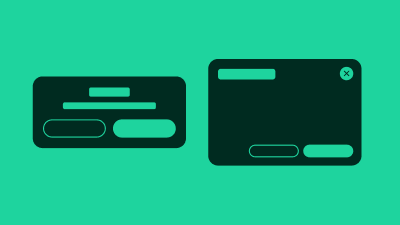
In traditional desktop operating systems, a lightbox dialog is a child-window that typically exists to communicate information to the user, display a prompt for input, or allow the user to verify or cancel an action.

Whilst these specific cases are also valid and true on the web, we also see a wide variety of other custom uses. For example, a dialog itself might contain an entire full page-like experience, a video, image gallery, navigation or settings.

There are various ways to visually present a dialog. The version here is the "lightbox" version. A dialog that visibly dims out the rest of the page while the dialog is open.

The lightbox-dialog is fully responsive. On large screens it will be aligned to the center of the screen; on small screens at the bottom. Small screens display an additional "handle" button, used to expand the dialog height.

Terminology

We use the following terminology when discussing this pattern.

  • lightbox-dialog : the pattern as a whole, comprised of the following sub parts
  • parent window : the page containing the button that opens the dialog
  • dialog button : the button that opens the child window
  • child window : the overlay containing the dialog content
  • title : the title of the child window
  • modality : modal or non-modal, dialogs with a mask are always modal
  • mask : CSS effect that visibly dims out the parent window content
  • dismiss button : button that dismisses and hides the lightbox
Layout Grid ComponentLink Component
Evo Web

Building accessible and performant components for the modern, responsive web. Empowering developers to create inclusive user experiences.

© 2025 Evo Web. All rights reserved.

Main

  • Components
  • Accessibility
  • Guides
  • Evo CSS Components
  • Evo Marko Components
  • Evo React Components
  • Sitemap

Web Guides and Best Practices

  • Page Grid Use Guide
  • Animation Guide
  • Skeleton Use Guide